Most engineers use a managed load balancer without thinking too much about it. CloudFrontCloudFrontAWS's Content Delivery Network (CDN). Caches and serves content from servers close to your users, reducing latency and load on your origin. Works with HTTP/HTTPS only — it cannot proxy raw TCP traffic like SSH. goes in front of the app, AWS handles the rest, and you move on. That's usually the right call. That's exactly why it's interesting when a real engineering team can't do that anymore.
This post is about Bitbucket Cloud and the problem that forced them to build their own edge. It's also about the pattern they used — a proxy plus a control plane — because this pattern shows up in more places than you'd expect once you know what you're looking at.
I'm writing this for mid-level developers: people who know what a load balancer does, have probably worked with CloudFront or an ALBALB — Application Load BalancerAn AWS managed service that distributes HTTP/HTTPS traffic across multiple backend servers. You define rules (e.g. route /api to this target group) and AWS handles the rest. Only works with HTTP — it can't handle raw TCP like SSH., and want to understand why someone would go past those tools.
The problem that started everything
Bitbucket needs to handle two very different types of traffic, both arriving at the same public address — bitbucket.org.
When you do git push or git pull over SSH, Git opens a raw TCPTCP — Transmission Control ProtocolA reliable way for two computers to send data over the internet. It guarantees bytes arrive in the right order and none are lost. Both SSH and HTTPS run on top of TCP — it's the pipe underneath them. connection on port 22. There are no HTTP headers, no request line, no URL path. Just encrypted bytes flowing through the socket. When you clone or push over HTTPS, it's normal web traffic — TLSTLS — Transport Layer SecurityThe encryption layer that sits on top of TCP. When you see HTTPS in a browser, TLS is what scrambles the data so only the intended recipient can read it. "SSL" is an older name for the same thing. handshake, HTTP request, headers, the usual.
Both have to arrive at the same hostname.
This one constraint removes most of the easy options. Let me explain why, because the reasoning is what's actually useful to take away.
What "Layer 7" means, quickly
When people say a load balancer works at "Layer 7Layer 7 — Application LayerThe top layer in the networking model. A Layer-7 device understands HTTP — it can read URLs, headers, and cookies to make smart routing decisions. CloudFront and Application Load Balancer (ALB) are Layer-7.", they mean it understands HTTP. It can read the URL path, look at headers, inspect cookies, and make routing decisions based on all of that. AWS CloudFront and Application Load Balancer (ALB) both work this way. They're very good at it.
SSH traffic is not HTTP. It's Layer 4Layer 4 — Transport LayerThe transport layer in the networking model. A Layer-4 device only sees source IP, destination IP, and port number. It can't read HTTP headers or inspect request content. It just forwards raw bytes. AWS Network Load Balancer (NLB) works at this layer. — a raw TCP stream. A Layer-7 service receives the SSH connection and has nothing to work with. There's no path to route on, no header to inspect. It can't forward it intelligently because there's nothing to inspect, so it just can't handle it.
You could use an AWS NLBNLB — Network Load BalancerAn AWS managed service that works at Layer 4. Unlike ALB, it can forward any TCP traffic without inspecting it. But because it doesn't understand HTTP, you lose per-request routing rules, path-based routing, and HTTP-level features. (Network Load Balancer) instead, since it works at Layer 4 and can forward any TCP traffic. But then you lose everything that makes Layer-7 useful — routing by path, per-request rules, caching. If you need both protocols at once, no single AWS product covers you.
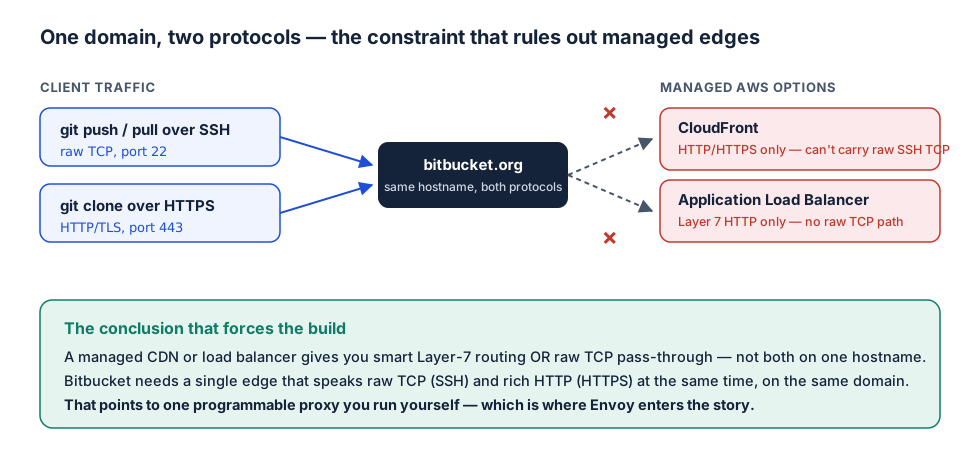
This technical constraint is what closed the door on every obvious managed replacement. CloudFront and ALB are HTTP-only. NLB can carry TCP but loses all Layer-7 routing. No single managed AWS product handles both SSH and HTTPS on the same hostname — which meant the replacement had to be something they ran themselves.
What was running before Envoy — and why it had to go
Before the Envoy migration, Bitbucket's edge ran on a commercial product called VTM — Virtual Traffic Manager, made by Pulse Secure. VTM sat in front of Bitbucket's backend services and handled routing, TLS termination, and request management. It had been there for years. And that was part of the problem.
Configuration nobody wanted to touch
The routing logic inside VTM was written in a Perl-based scripting language. What started as a manageable set of rules had, over time, grown to roughly 2,500 lines of routing scripts with around 500 if blocks. Each new product requirement added another conditional. Each conditional made the next change harder. By the time the migration was underway, the configuration was a real liability — hard to reason about, risky to modify, and nearly impossible to test properly.
No auto-scaling, and a fixed bandwidth ceiling
VTM did not support auto-scaling. When Bitbucket needed more capacity, the team couldn't just spin up more instances — they had to negotiate with the vendor to purchase additional licenses. The allocated network bandwidth was also fixed. Bitbucket was regularly hitting that ceiling and sometimes exceeding it. A commercial appliance on fixed terms works fine when traffic is stable and predictable. It becomes a reliability risk when you're running a code hosting platform where traffic spikes come with the job.
Single region, with escalating costs on top
All of this ran in a single region. Traffic from Asia Pacific had to travel much further than it needed to. And sitting in front of VTM was AWS Global AcceleratorAWS Global AcceleratorAn AWS service that routes traffic through AWS's own backbone network to your endpoints. Unlike CloudFront (HTTP-only), it works at Layer 4 and can carry any TCP/UDP traffic including SSH. Faster than the public internet, but comes with licensing and bandwidth costs that grow with traffic., which added its own growing cost — licensing and bandwidth fees that scaled with traffic volume, to a point where the combined setup was no longer sustainable.
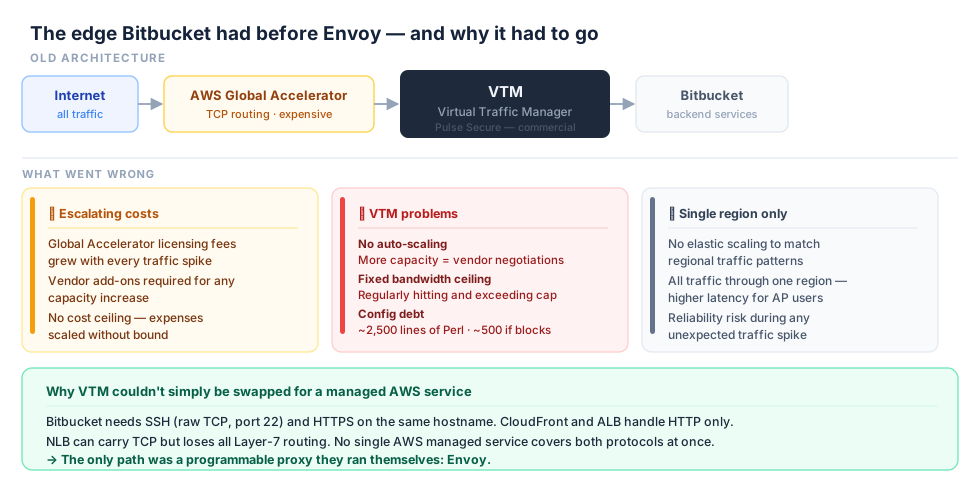
This is what pushed Atlassian to replace the whole edge, not just swap one load balancer for another. The question then became: what do you replace it with, when the standard managed options can't handle both protocols?
What is Envoy, and how does it actually work?
The tool Bitbucket chose is Envoy, an open-source proxy originally built at Lyft. You may have heard of it in the context of service meshes like IstioIstioAn open-source service mesh for Kubernetes. Under the hood it uses Envoy as the data-plane proxy (one per pod, as a sidecar) and its own control plane called Istiod to configure them via xDS. If you've used Istio, you've been using the exact same pattern this post is about. — Envoy is the sidecarSidecar proxyA small proxy that runs alongside each service in a container or pod. It intercepts all network traffic to and from the service, applying routing and security rules — transparently, without the main service code knowing it's there. Envoy is the most common sidecar proxy used in service meshes. proxy that does the actual network work in those setups. But it also works fine as a standalone edge proxy.
The reason Envoy fits this situation is that it handles both protocols in one binary. For HTTPS traffic, it terminates TLS and applies HTTP routing rules. For SSH traffic, it acts as a transparent TCP proxy — it just forwards the bytes without looking at them. Same program, very different behaviour depending on the port.
Understanding why Envoy is flexible like this requires knowing a bit about its internal model. There are four main concepts:
Listener — a port that Envoy opens and listens on. You can have multiple listeners. One for port 443 (HTTPS) and another for port 22 (SSH). Think of it like a socket binding — it just accepts raw incoming connections.
Filter chain — the list of processing steps that runs on each connection after it arrives on a listener. For the HTTPS listener, the filter chain does TLS termination and then HTTP routing. For the SSH listener, the filter chain is just a TCP proxy filter that forwards bytes without touching them.
Route table — inside the HTTP filter chain, the routing rules that decide which backend gets the request. /api/v2/* goes here, /static/* goes there. This only applies to HTTP connections — the SSH path skips this step entirely.
Cluster — a group of backend servers. If you've used an ALB, a cluster is like a target group. Envoy picks a server from the cluster and sends the request to it.
Here's how a request flows through these pieces:
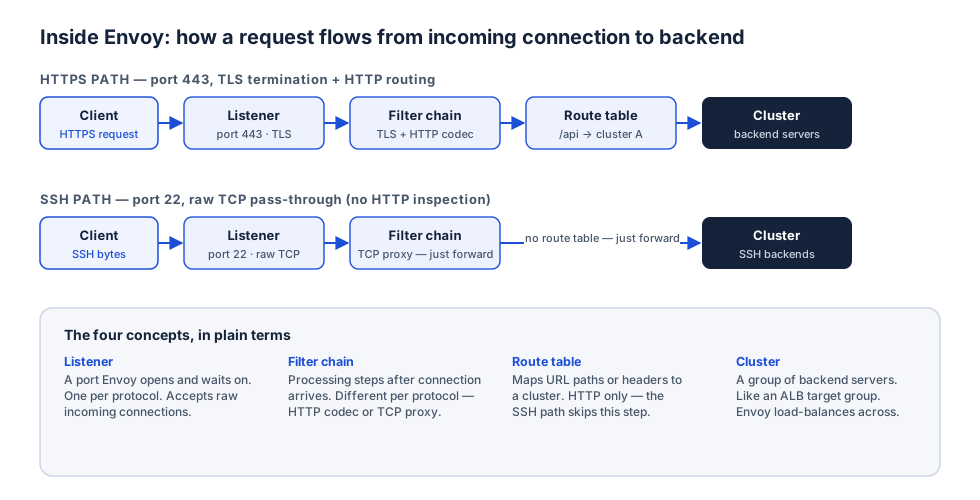
The HTTPS path goes all the way through: Listener → Filter chain (TLS + HTTP) → Route table → Cluster → Backend. The SSH path skips the route table: Listener → Filter chain (TCP proxy) → Cluster → Backend. Same proxy binary, different path through it depending on the protocol.
If you're thinking in AWS terms: Envoy's listener is like an ALB listener, the filter chain is like the rules attached to it, and a cluster is like a target group. The important difference is that Envoy can do this for raw TCP too, which is exactly why it fits where an ALB doesn't.
Why running your own proxy is only half the problem
Switching from AWS to a self-hosted Envoy doesn't fully solve the problem. It just moves it somewhere else.
A real edge at a company like Atlassian isn't one proxy. It's many proxies, running in multiple regions, in front of many services. Routing rules change constantly — teams ship new code, new services get added, rate limits get adjusted per customer. If you have to edit a config file and restart a proxy every time something changes, you've replaced a managed service with a lot of manual work. And you've also created a bottleneck: every change waits on whoever owns the config file.
The hard engineering problem isn't the proxy. It's how you keep the proxy's configuration correct and up to date, across a whole fleet, with many teams making changes independently, without any of them breaking anything else.
The xDS protocol: how Envoy gets its configuration
This is the piece that makes dynamic configuration possible, and most explanations of Envoy skip it or mention it only briefly. I want to spend a bit more time on it.
Envoy uses a protocol called xDSxDS — Discovery Service APIsA family of APIs that Envoy uses to receive its full configuration at runtime, without restarting. "x" is a placeholder: LDS, RDS, CDS, and EDS are all xDS APIs. A control plane like Sovereign acts as the xDS server, and Envoy proxies subscribe to it for live updates. to receive its configuration at runtime. The name stands for "x Discovery Service" — the "x" is a placeholder for the type of resource. The main types are:
- LDS (Listener Discovery ServiceLDS — Listener Discovery ServiceAn xDS API that tells Envoy which ports to open (listeners). When the control plane pushes an LDS update, Envoy immediately starts listening on the new ports — no restart needed.) — tells Envoy which ports to open and listen on
- RDS (Route Discovery ServiceRDS — Route Discovery ServiceAn xDS API that gives Envoy its HTTP routing rules. Maps URL paths or headers to specific clusters. Not to be confused with AWS RDS (the database service) — same abbreviation, completely different thing.) — gives Envoy its routing rules for HTTP
- CDS (Cluster Discovery ServiceCDS — Cluster Discovery ServiceAn xDS API that tells Envoy which groups of backend servers (clusters) exist. Like syncing ALB target groups in real time, without a redeploy.) — tells Envoy which groups of backends exist
- EDS (Endpoint Discovery ServiceEDS — Endpoint Discovery ServiceAn xDS API that gives Envoy the actual IP addresses inside each cluster. When a new instance starts or an old one goes away, EDS updates Envoy immediately — traffic shifts without any manual work.) — gives Envoy the actual IP addresses inside each cluster
Together, these four APIs cover Envoy's entire configuration. All of it can be managed dynamically, at runtime.
Here's how it works in practice. Envoy starts up and connects to a management server — the control plane. It sends a request saying: "Give me my current listener configuration." The control plane responds with the full list of listeners. Envoy applies them immediately — live, while running, with no restart. Then it asks for routes, clusters, and endpoints in the same way. Each time the control plane responds, Envoy updates its running state.
When something changes — a new service is onboarded, a rate limit is adjusted — the control plane sends an updated response. Envoy applies the new config. The whole fleet is updated without anyone touching the proxies directly.
This is very different from the traditional approach: write a YAML config file, check it into git, redeploy the proxy, wait for the restart to finish. With xDS, none of that is needed.
The real idea: configuration as output, not as files
This is where Atlassian's own contribution comes in. They built a control plane system called Sovereign to serve xDS responses to their Envoy fleet. They later open-sourced it.
The shift in thinking that Sovereign represents: configuration is no longer something you write and store. It's something you generate, on demand, from two inputs:
- Templates — a blueprint describing the general shape a proxy in this environment should have. Which filter chains. What global rules. What auth logic applies everywhere.
- Live context — which services currently exist, who has opted into routing, what rate limits each tenant has right now.
Every time an Envoy proxy asks for its configuration via xDS, Sovereign builds a fresh, complete Envoy config from these two inputs and returns it. The proxy applies it immediately. That's the whole system.
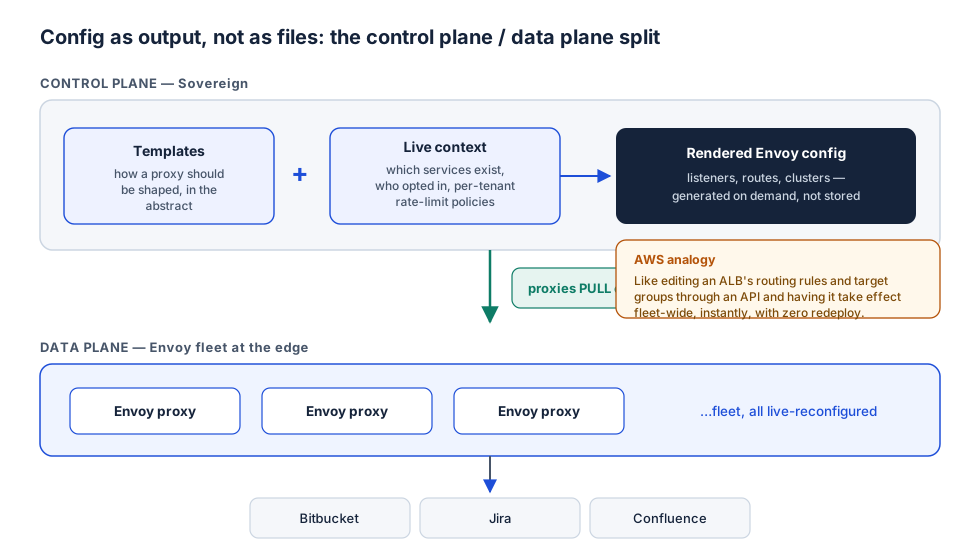
Think about what this means for a developer at Atlassian who wants to route traffic to their new microservice through the edge. With static config files, they open a PR to edit the central proxy config, wait for a reviewer, wait for deploy, and the proxy restarts. With Sovereign, they register their service in Sovereign's data store. The next time the proxies poll for config, they automatically get routes to the new service. No PR to the platform team's repository. No restart.
The control plane is also the natural place to add cross-cutting logic — things that should apply at the edge for every service, consistently. Rate limiting per tenant, auth header injection, traffic metrics. These live in the template logic once, and apply to all proxies automatically. Every team benefits without having to implement it themselves.
Static config versus a control plane
The difference between the two approaches is easier to see as a comparison:
| Static config files | Control plane (xDS) | |
|---|---|---|
| How config changes | Edit a file, redeploy | Regenerate from templates + current context |
| Applying a change | Restart or reload the proxy | Proxy pulls live — no restart |
| Source of truth | The file in the repo | The generated output |
| Scales to many teams | Hard — one team becomes the bottleneck | Yes — teams give context, not files |
| Cross-cutting logic | Duplicated or scattered across services | One place, in the control plane templates |
| Right for | A few stable services | Many services, frequent change |
The trade-off — and when you should not build this
I want to be direct about this, because it's easy to read a post like this and feel like you should build a control plane.
A control plane is real software. Someone has to build it. Someone has to run it, monitor it, debug it, and keep it producing correct output. This matters a lot — a bug in the system that generates your edge configuration is potentially a bug that affects everything behind the edge, all at once. You're now responsible for the availability of a system that has to stay running reliably, which is exactly what a managed AWS service was giving you for free before.
The simple rule: build something like this when you have many services and many teams, when configuration changes constantly, and when a hard technical constraint — like the dual-protocol problem above — closes the door on managed options. Do not build this if you have three services. At that scale, an ALB or API Gateway is simpler, cheaper, and entirely good enough. Reaching for a control plane there is the expensive and unnecessary mistake.
What this pattern is called, and where else you'll see it
Strip away the Bitbucket-specific details and the underlying pattern is:
- A data plane (Envoy) that handles actual traffic and can be reconfigured live, without restarts
- A control plane (Sovereign) that builds configuration from templates and current state, instead of storing static files
- xDS as the protocol between them — how the data plane pulls its config from the control plane
This is exactly how IstioIstioAn open-source service mesh for Kubernetes. Under the hood it uses Envoy as the data-plane proxy (one per pod, as a sidecar) and its own control plane called Istiod to configure them via xDS. If you've used Istio, you've been using the exact same pattern this post is about. works under the hood. Istio's control plane is called Istiod. The sidecar proxies in each pod are Envoy instances. They pull their configuration from Istiod via xDS. If you've ever used Istio, or worked in a Kubernetes cluster with a service mesh, you've been on the receiving end of this same pattern.
Most of the time you won't need to build any of this. Managed services cover the common cases well, and they're the right default. But knowing that this pattern exists — data plane + control plane + xDS — and knowing when the constraints actually point to it, is the difference between reaching for the right tool and building something unnecessarily complicated.
Sources and further reading
- Atlassian Engineering — How we migrated Bitbucket Cloud to Envoy proxy — the product-level view: motivations, constraints, and upstream contributions
- Vasilios Syrakis — a talk by the engineer who built Atlassian's xDS control plane "Sovereign" — the platform-builder's view
- Envoy proxy documentation — for the data-plane internals in full detail: how requests flow through listeners, filter chains, routes, and clusters